Any tech-privacy-computer experts on here?

VPN won't fail if you get an actual VPN app such as NordVPN. They also have killswitch feature so IF you did lose connection it will automatically turn off your internet connection. Just get a real VPN app and use Chrome on your other machine if you HAVE to use Chrome for some reason (I don't understand why this would be though, all browsers support HTML protocol, it's not like Chrome magically is the only browser that would work on certain sites).

VPN extension vs app: "VPN extensions are typically slower than VPN desktop apps. They only protect browser traffic, which may leave personal information on the device vulnerable to cybercriminals. VPN extensions are less secure, and most of them don't actually encrypt your connection."

One thing that is critical is that VPN browser extensions DO NOT have a KILLSWITCH.

I would say just get a VPN app and download the installer and install the actual app. It will be much safer for you even if it is just a site you don't wanna get kicked off of.

Do not log in to any other sites using Chrome. None at all (except your VPN account). Make sure your chrome browser isn't logged in. They try to get you to login to your Google account to sync your history. It really would be best to use duckduckgo, then if that's not an option for some reason, use Firefox. Seriously, chrome is the worst.

Before logging in, set your browser for maximum privacy using the available settings:


Thanks for this info bro. I've added firefox and nord to my other chromebook but I need to look into the cost of nord before I sign up for that instead of using a free vpn extension in chrome.

So just to be clear.....if I use firefox and nord all I need to do on that device is NOT have the chrome browser open at the same time (to avoid syncing) and NOT be logged into any other websites apart from the one I'm trying to use and hide my IP on???
 
Nord VPN or Surfshark VPN are excellent vpn that can chain ip addresses, hide ip and other things to surf the internet anonymously.
 
Thanks for this info bro. I've added firefox and nord to my other chromebook but I need to look into the cost of nord before I sign up for that instead of using a free vpn extension in chrome.

So just to be clear.....if I use firefox and nord all I need to do on that device is NOT have the chrome browser open at the same time (to avoid syncing) and NOT be logged into any other websites apart from the one I'm trying to use and hide my IP on???
It's not just having both chrome open at the same time. If you login to any site at all it leaves a cookie in your browser. This lets the site identify you later. This is how we don't have to login to meso every single time we visit. If you "clear all history and cache and cookies" it will flush those cookies out.

The sync isn't between computers. It is to your Google account on Google servers. So asynchronous synchs can occur. You login one at 9 am, do stuff, then logoff. Then another the next day, do stuff, and log off. They will still sync.

I just had double carpal tunnel surgery so I went be in for a few days. Using the phone or typing ig really rough.
 
You can change the browser, opera, obit or others. Which have a privacy mode, which, other things being equal, does not leave cookies and other traces. Anonymity is a lot of factors, not just vpn.
 
Check out my posts in the privacy threads. I've broke down best VPNS, made threads about privacy and security. I have worked in the industry for over a decade.

Don't use Chrome. Why do you need Chrome? You could TRY using private browsing windows but they can still ID you based off your hardware, your screen size, your IP address, etc.

Your best bet is to just buy a cheap ass laptop meant for internet browsing only and then get a paid VPN on that and use your secondary account on the laptop and your first one on the current computer.
Would two different browsers on the same computer give you two different fingerprints? So say you use your real IP on Chrome and then turn on VPN before you open up Firefox. Would that be *almost* as good as using two different computers?
 
Number one you're using the Chrome Browser.

True anonymity doesn't exist on the net.

If you are engaging in something illegal from which you could get caught.

A computer with disconnected hard drive(disconnect the data and power cable), running a ISO copy(downloaded from distrowatch.org) of TAILs (Linux TOR browser to hide the origin of your activity) in a optical drive and running a VPN to hide your activity from your ISP.

Once your activity for the day is over you simply turn off the computer with no hard drive to have left no trace even in your ram as long as you power down for the night.

TOR is very slow, can restrict access to certain sites because the complete list of exit nodes are published allowing site owners to block access. There's some questions about who actually owns these exit nodes. Doesn't allow you to chose exit nodes. TOR is a decentralized privacy access tool.

VPN hides IP address and changes your perceived location. Encrypts data from you and your VPN. So your CPU.....encrypted....to VPN.....leaves VPN server no longer encrypted. VPN does allow you to chose your exit nodes. The VPN shifts you away from your ISP into the hands of your VPN, so you are putting trust in your VPN provider, but you are also getting that encryption service that is important to keep your data out of the hands of your ISP. You are operating off a promise from your VPN provider for "no logs" regular audits to make sure this promise is held to, but it's still just a promise. VPN is a centralized privacy access tool.

The trick is to combine both of these in what is called Tor/VPN or Tor over VPN. So you connect first to the VPN then you access the TOR network using the TOR browser. This encrypts your data first and then hides the fact that you're using TOR so you don't get stuck and blocked using TOR exit nodes. Your ISP also doesn't know you're using TOR which is flagged by your ISP as suspicious.

This requires using a VPN provider that is compatible with the TOR browser. Once you have that it's just a simple matter of first accessing your VPN and then opening the TOR browser and you are about as good as I would care to be, but prepare for some seriously slow speeds.


And of course there is decentralized DVPN service that is paid for using crypto. This might be more secure, but the question, who is your provider when it could be LE as there's no audit being done on these decentralized VPN providers.

The weakness of TOR is that there could be someone watching entry and exit nodes and since the exit node is when the final layer of encryption is removed, someone could figure out what you're doing. The problem with this is that when using TOR the first person in the 4 nodes can see your IP address and if there's is an asshole in the last node removing the encryption working with the first node entry point this could expose you.

I'm not a security expert, just someone that has used Linux for 25+ years and has used the above method.
I was under the impression that using VPN over Tor is bad opsec and that the only thing that the VPN gives you (when using Tor) is to hide the fact that youre using Tor from your ISP. But for this, could you not also use a bridge instead?
 
Would two different browsers on the same computer give you two different fingerprints? So say you use your real IP on Chrome and then turn on VPN before you open up Firefox. Would that be *almost* as good as using two different computers
No because websites can still see screen size/resolution, connection speed, mouse speed and movements, a fair bit of software plug-ins, OS, etc. This info may or may not be enough to be able to tell what you're up to.

At that point just download VitualBox and build a VM and use that with a VPN.
 
I was under the impression that using VPN over Tor is bad opsec and that the only thing that the VPN gives you (when using Tor) is to hide the fact that youre using Tor from your ISP. But for this, could you not also use a bridge instead?
It is CRITICAL to hide Tor usage from your ISP. They will log all Tor traffic and potentially keep it for a much longer period of time than other stuff because they assume it is incriminating. Never even start Tor without a VPN turned on first, with the killswitch on so it severs the connection if you lose VPN.
 
@MFAAS

Big respect to you bro for all the advice in this thread. You've helped me a lot!.
I'm not happy about the new subscription I'm paying to nordvpn but it's worth it if the service actually works and keeps me hidden.

I'll start using the vpn on my 2nd chromebook next week (with firefox browser) and I'll be connecting from a different IP than my other chromebook just incase the connection drops. The killswitch info was a priceless education but I've not figured out how to set that up yet. I think it's called "always on" with my device.
 
It is CRITICAL to hide Tor usage from your ISP. They will log all Tor traffic and potentially keep it for a much longer period of time than other stuff because they assume it is incriminating. Never even start Tor without a VPN turned on first, with the killswitch on so it severs the connection if you lose VPN.
Now i'm a little confused tbh. I thought the general consensus in the cybersecurity community was to not use a VPN with Tor as it *possibly* decreases security, because VPN acts (generally) as a permanent entry guard. If your primary objective is to hide Tor usage from your ISP, wouldn't a Tor bridge (i.e. custom bridge in Tails) solve this issue in a more secure way (i.e. not giving away your data to a VPN provider)?

disclaimer: im a total noob and belives blindly in what the dn bible tells me.
 
Now i'm a little confused tbh. I thought the general consensus in the cybersecurity community was to not use a VPN with Tor as it *possibly* decreases security, because VPN acts (generally) as a permanent entry guard. If your primary objective is to hide Tor usage from your ISP, wouldn't a Tor bridge (i.e. custom bridge in Tails) solve this issue in a more secure way (i.e. not giving away your data to a VPN provider)?

disclaimer: im a total noob and belives blindly in what the dn bible tells me.
You can read my opinions on this here in the thread I wrote, at the end "Turn it up to 11: If you want to go ALL OUT and turn that privacy/anonymity dial up to 11, instead of following 3a, search DuckDuckGo for darknet privacy guides, they are much more extreme in some places than this. The main difference will be the recommendation not to use a VM anymore, but instead having a burner laptop with Tails installed isn't hard, and is the best level of privacy and anonymity you can attain so long as you do it right. Probably overkill for what we do, but some people want the peace of mind. Then worst case scenario you can just smash the hard drive and literally destroy any evidence."

If you read through the full thread there is even more info in there on passwords, passphrases, some really good OPSEC stuff on page 2 especially, and most importantly, here is some great info on VPNs: "Free VPN?" and here is a subsection from the Privacy Guide: "
Use a good, PAID VPN that does not keep logs. The following are considered the best VPNs.
- ExpressVPN - there is a real-world case where one of their servers was seized by law enforcement and turned up ZERO information, which verifies that they really do not keep any logs. They also have a third-party audit verifying that they do not keep logs. This is the number 1 choice for VPNs IMO.
- Perfect Privacy - there may be a real-world case here too. Perfect Privacy announced that Dutch authorities had seized two of their servers as part of an investigation and said nothing was turned up as they don't keep logs. They didn't say why the servers were seized though, so it's possible that they weren't looking for customer connection logs anyway...we aren't really sure.
- VyprVPN - third-party audited to verify no logs are kept at all
- NordVPN - has an audit verifying they don't keep logs, however this was an internal audit, so it is possible it's not true, though we have NO reason to believe that is the case.
-
PureVPN was proven by an FBI case that THEY DO FUCKING KEEP LOGS. They are fucking LIARS and if you use PureVPN you should cancel your account immediately and switch to one of the other 3 above. Since then they have said they've updated their policy and no longer keep logs, but I wouldn't trust them ever again, not after someone go arrested (not saying they didn't deserve it, but the principals of the PureVPN as a company are obviously bullshit."


As I mention in that post, the DNM bible is absolutely correct. However, it is total overkill for buying some gear over tutanota. If you're browsing DNMs for very illegal things, then yeah you want to be the most careful.

However, if you are using TOR, NEVER use it from your house. Your DNM machine should never, ever be turned on in your home. I would literally wear a fucking disguise, go somewhere that you can hop on open wifi, best case is somewhere there is no cameras. Otherwise go somewhere super busy so you can't be distinguished. Just make sure you park somewhere else so your license plate can't be associated to you. Then I'm talking about wear a hat, sunglasses, fake beard, walk with a limp and change your posture, maybe get a little fat suit so that you look like a fat guy or something lol. Get a screen privacy protector so nobody can peep on you, and do your thing quick then get out. Preferably switch up locations, too. One nice feature NordVPN has is "Invisibility on LAN" which keeps your machine invisible, public networks can be dangerous places, best not be seen on the network or you may be portscanned and someone could compromise your machine.

So basically, only if you are taking EXTREME OPSEC measures should you not use a GOOD, proven VPN with TOR. In my opinion. Some may disagree. Keyword there is PROVEN.

However, there are differing opinions on VPNs decreasing security. The biggest factor is trust in the VPN provider. This is why using a paid VPN is so important. Many VPNs have been caught keeping logs, particularly the free ones. This is where the risk is. If LE can track your TOR connection back to the IP of the VPN server, then that is the egress point of your connection. They could then serve a warrant to tell the VPN to hand over the user info. Now, if you pay with bitcoin or XMR from a wallet that is several hops away from your coinbase/whatever account, use a throwaway email, and ensure no identifying personal info can be connected to your account, then there should be no way to trace you unless they were actively monitoring connections, which I personally have not heard of happening. I only hear of serving warrants to hand over whatever data these companies have. That's it. If the data is worthless, then they either move on because you aren't a high value target or they keep trying. This is why I talk about layers of security in the other threads. Every layer makes it harder to get to you.


@MFAAS

Big respect to you bro for all the advice in this thread. You've helped me a lot!.
I'm not happy about the new subscription I'm paying to nordvpn but it's worth it if the service actually works and keeps me hidden.

I'll start using the vpn on my 2nd chromebook next week (with firefox browser) and I'll be connecting from a different IP than my other chromebook just incase the connection drops. The killswitch info was a priceless education but I've not figured out how to set that up yet. I think it's called "always on" with my device.
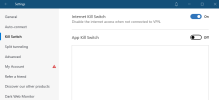
Hmm, I am not sure about "Always on" if you're using NordVPN. I would expect the setting names to be the same regardless of operating system...Can you send me a screenshot of the settings options? This is what mine looks like:

1656844533056.png


As y'all can see my hands are doing much better. Get prepared for some more extra-long posts from yours truly! You know I love to hear the clickity clack of my mechanical keyboard ;)
 
You can read my opinions on this here in the thread I wrote, at the end "Turn it up to 11: If you want to go ALL OUT and turn that privacy/anonymity dial up to 11, instead of following 3a, search DuckDuckGo for darknet privacy guides, they are much more extreme in some places than this. The main difference will be the recommendation not to use a VM anymore, but instead having a burner laptop with Tails installed isn't hard, and is the best level of privacy and anonymity you can attain so long as you do it right. Probably overkill for what we do, but some people want the peace of mind. Then worst case scenario you can just smash the hard drive and literally destroy any evidence."

If you read through the full thread there is even more info in there on passwords, passphrases, some really good OPSEC stuff on page 2 especially, and most importantly, here is some great info on VPNs: "Free VPN?" and here is a subsection from the Privacy Guide: "
Use a good, PAID VPN that does not keep logs. The following are considered the best VPNs.
- ExpressVPN - there is a real-world case where one of their servers was seized by law enforcement and turned up ZERO information, which verifies that they really do not keep any logs. They also have a third-party audit verifying that they do not keep logs. This is the number 1 choice for VPNs IMO.
- Perfect Privacy - there may be a real-world case here too. Perfect Privacy announced that Dutch authorities had seized two of their servers as part of an investigation and said nothing was turned up as they don't keep logs. They didn't say why the servers were seized though, so it's possible that they weren't looking for customer connection logs anyway...we aren't really sure.
- VyprVPN - third-party audited to verify no logs are kept at all
- NordVPN - has an audit verifying they don't keep logs, however this was an internal audit, so it is possible it's not true, though we have NO reason to believe that is the case.
-
PureVPN was proven by an FBI case that THEY DO FUCKING KEEP LOGS. They are fucking LIARS and if you use PureVPN you should cancel your account immediately and switch to one of the other 3 above. Since then they have said they've updated their policy and no longer keep logs, but I wouldn't trust them ever again, not after someone go arrested (not saying they didn't deserve it, but the principals of the PureVPN as a company are obviously bullshit."


As I mention in that post, the DNM bible is absolutely correct. However, it is total overkill for buying some gear over tutanota. If you're browsing DNMs for very illegal things, then yeah you want to be the most careful.

However, if you are using TOR, NEVER use it from your house. Your DNM machine should never, ever be turned on in your home. I would literally wear a fucking disguise, go somewhere that you can hop on open wifi, best case is somewhere there is no cameras. Otherwise go somewhere super busy so you can't be distinguished. Just make sure you park somewhere else so your license plate can't be associated to you. Then I'm talking about wear a hat, sunglasses, fake beard, walk with a limp and change your posture, maybe get a little fat suit so that you look like a fat guy or something lol. Get a screen privacy protector so nobody can peep on you, and do your thing quick then get out. Preferably switch up locations, too. One nice feature NordVPN has is "Invisibility on LAN" which keeps your machine invisible, public networks can be dangerous places, best not be seen on the network or you may be portscanned and someone could compromise your machine.

So basically, only if you are taking EXTREME OPSEC measures should you not use a GOOD, proven VPN with TOR. In my opinion. Some may disagree. Keyword there is PROVEN.

However, there are differing opinions on VPNs decreasing security. The biggest factor is trust in the VPN provider. This is why using a paid VPN is so important. Many VPNs have been caught keeping logs, particularly the free ones. This is where the risk is. If LE can track your TOR connection back to the IP of the VPN server, then that is the egress point of your connection. They could then serve a warrant to tell the VPN to hand over the user info. Now, if you pay with bitcoin or XMR from a wallet that is several hops away from your coinbase/whatever account, use a throwaway email, and ensure no identifying personal info can be connected to your account, then there should be no way to trace you unless they were actively monitoring connections, which I personally have not heard of happening. I only hear of serving warrants to hand over whatever data these companies have. That's it. If the data is worthless, then they either move on because you aren't a high value target or they keep trying. This is why I talk about layers of security in the other threads. Every layer makes it harder to get to you.


Hmm, I am not sure about "Always on" if you're using NordVPN. I would expect the setting names to be the same regardless of operating system...Can you send me a screenshot of the settings options? This is what mine looks like:

View attachment 168581


As y'all can see my hands are doing much better. Get prepared for some more extra-long posts from yours truly! You know I love to hear the clickity clack of my mechanical keyboard ;)

This is some in-depth privacy porn to my liking! I will probably spend hours going through your anonomity post.

Is there a good reason paid protonvpn is not on your list? I know proton "cooperates" with LE, but havn't they said that they don't give out encryption keys, so LE basically cant use the info for anything useful? Is there any counter evidence to this?

If I "turn it up to 11"; what's the reason for not doing this from inside my home? If using dedicated laptop --> tails on usb stick --> custom tor bridge --> Tor
How can this be traced back to me, even using my home wifi?
 
@MFAAS while I wait for my other reply to get mod-approved:

After starting to read your posts I realize I need to use a password manager. I don't mind paying for it. Whats your thoughts on 1password and bitwarden? I like that bitwarden is open source, but 1password is favored by many due to better ux.
 
Hmm, I am not sure about "Always on" if you're using NordVPN. I would expect the setting names to be the same regardless of operating system...Can you send me a screenshot of the settings options? This is what mine looks like:


I'll do that next week bro. So far all I've done is sign up and connect and visit ip2location to see what the IP address is. I've not fully looked at all the nord settings yet but I recall activating an "always on" feature...........or maybe that was on the free vpn extension I installed on my main (this) laptop.

Hiding can get complicated :D
 
@MFAAS while I wait for my other reply to get mod-approved:

After starting to read your posts I realize I need to use a password manager. I don't mind paying for it. Whats your thoughts on 1password and bitwarden? I like that bitwarden is open source, but 1password is favored by many due to better ux.
Honestly I don't think it is too important which one you use. I used "Password Manager" for a long time Nd it was fine but didnt have MFA. I now use an enterprise solution (i cant say which, but this is one of the pros of being in IT security) setup on my home network that we can login with 2 factor Auth (aka 2FA/MFA) to access our passwords. I use Aegis app on my phone for MFA, which is open source and proven.

I personally would make a firewall rule to block inbound and outbound internet access for whatever pw manager you use (inbound should be blocked by default). That way just in case there is any danger of it phoning home for something you block it. This can be done in Windows Firewall or with many Antivorus programs. Youll have to manually perform upgrades, and maybe I am just paranoid.

I Have also tried bitwarden, last pass, and keeper security. I thought they were all good. Really anything of those are gonna be pretty solid and support MFA. Out of those I like bitwarden a lot for being open source, personally.
 
I'll do that next week bro. So far all I've done is sign up and connect and visit ip2location to see what the IP address is. I've not fully looked at all the nord settings yet but I recall activating an "always on" feature...........or maybe that was on the free vpn extension I installed on my main (this) laptop.

Hiding can get complicated :D
Sounds good man. Feel free to post here or pm me too. Happy to help.
 
@Millard You will probably not like me for pinging you like this, but post #31 in this thread is still awaiting approval and I think it's a mistake by your filter :)

("This message is awaiting moderator approval, and is invisible to normal visitors.")
 
This is some in-depth privacy porn to my liking! I will probably spend hours going through your anonomity post.

Is there a good reason paid protonvpn is not on your list? I know proton "cooperates" with LE, but havn't they said that they don't give out encryption keys, so LE basically cant use the info for anything useful? Is there any counter evidence to this?

If I "turn it up to 11"; what's the reason for not doing this from inside my home? If using dedicated laptop --> tails on usb stick --> custom tor bridge --> Tor
How can this be traced back to me, even using my home wifi?
So the ISP won't automatically know thay you are using TOR thanks to the bridge, however if there was ever any level of investigation it would be quite easy for them to figure out what you're doing and trace it back to you.

Lots of people use protonmail without encrypting anything. In fact most people who buy steroids often don't even use PGP encryption for their own fucking address that they want the shit sent to. The only way to encrypt a message is using ptoron to Proton or tuta to tuta and you have to somehow agree on an encryption password ahead of time via some other platform so it isn't sitting in a past email in clear text, then agree to use that going forward and trust the vendor to remember.

Much better to just use PGP encryption with a PGP utility command line or application to encrypt any personal info with zero exceptions. If a vendor won't provide a PGP key I will absolutely never do business with them. Never. And if they do stupid shit like send a postal tracking number in clear text then they should quit being a vendor now and go work at fucking McDonald's or some shit.
 
Back
Top