How do I send stablecoin to a source?

Are there any other UGLs that only accept USDT or DC? How come 98% sources seem to be OK continuing accepting bitcoin as payment?

Bitcoin is the easiest by default and most people are relatively familiar with it

Some members pushed sources to accept more cryptocurrencies that have other advantages like increased apparent OPSEC/privacy, so instead of losing a potential sale, sources started accepting other coins

Whether it actually matters, I have no idea
 
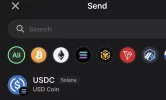
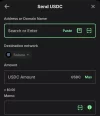
Find where your wallet says “USDC” with your funds - you might have to click on “more assets” to find it. Then you should see the transfer button shown here

Edit: and of course, if you're genuinely asking for help this community she be just for that. if its you being lazy and asking to be spoon-fed its a diff story.
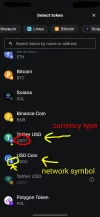
When you say my “wallet” do you mean the Coinbase one? Or do I need to create another wallet transfer from Coinbase to that then send funds from “my wallet”? I really appreciate all the help and I’m sorry for being so uneducated on this. Also there’s 2 USDC options one with a little “s” on it one without, is the “s” one the preferred one he’s asking for?
 
When you say my “wallet” do you mean the Coinbase one? Or do I need to create another wallet transfer from Coinbase to that then send funds from “my wallet”? I really appreciate all the help and I’m sorry for being so uneducated on this. Also there’s 2 USDC options one with a little “s” on it one without, is the “s” one the preferred one he’s asking for?
I may have figured it out, I tried to send the one with the “s” next to it, he wants the non s version. That may solve this, now I just hope I don’t send it into the void.
 
Thanks for not telling me to go fuck myself, or posting an AI generated meme of a juiced up old man frustrated at a computer. I can’t find the “send to another wallet” button, usually I just hit “transfer crypto” paste the venders address and it’s done. On Coinbase is there literally a “send to another wallet” button I’m not finding? Again thanks for the help I’ll send you 20$ if I ever figure this out as a tip.
oldmancomputer.webp
 
When you say my “wallet” do you mean the Coinbase one? Or do I need to create another wallet transfer from Coinbase to that then send funds from “my wallet”? I really appreciate all the help and I’m sorry for being so uneducated on this. Also there’s 2 USDC options one with a little “s” on it one without, is the “s” one the preferred one he’s asking for?
If you want a long term relationship to Coinbase (exchange) , then use another wallet ( Exodus wallet is fairly easy to use, and better swapping possibilities then Coinbase)
-> send funds from Coinbase to-> Exodus, and then to the -> Vendor adress....

I've been thrown off Coinbase, cuz I delt with to many 'red flagged' addresses.....

(Learning crypto will cost you a bit of money, Buy a bit more then you need , try send some to yourself/try 'what swapping is' - maybe figure out that some 'networks' are way faster then others.... 'Learning by throwing some money out the window in fee's' , but it will make you a better 'Crypto-expert' faster)
 
I find USDT and Sol network using Kraken as the platform is easiest. Usually very fast transaction ans cost less than $1 gas fee. No need to buy Sol for gas, it will just us your USDT as gas.
Thanks for the tip. I need to download Kraken. What's the trick to making sure you're on the solana Network before you send it? I'm using an Android phone when I download the app. I didn't see that option on coinbase but that app so hard to use.
 
I find USDT and Sol network using Kraken as the platform is easiest. Usually very fast transaction ans cost less than $1 gas fee. No need to buy Sol for gas, it will just us your USDT as gas.
I'm going to try that first. I'm researching it but a lot of it is confusing. Setting up another wallet sounds like really confusing. Do you just send it straight from Kraken just using the free internal wallet they kind of give you without setting one up? I see on the directions doing it that way it doesn't say you can send usdc on Solana?
 
I'm going to try that first. I'm researching it but a lot of it is confusing. Setting up another wallet sounds like really confusing. Do you just send it straight from Kraken just using the free internal wallet they kind of give you without setting one up? I see on the directions doing it that way it doesn't say you can send usdc on Solana?
Here’s a clean, simple mini-guide for buying Solana -> USDC (Solana network) and sending it:

1. Download Trust Wallet and create a wallet.

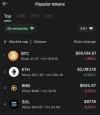
2. After setup, go to the SOL token (from popular tokens) and buy about $5 of SOL first. This is just to cover network fees.

IMG_5543.webp

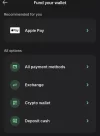
3. Go back to the main screen -> tap Buy (or Fund) -> All payment methods.

IMG_5548.webp

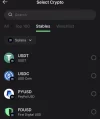
4. Choose Stablecoins -> select Solana network.

IMG_5549.webp

5. Pick USDC (Solana) or USDT (Solana), whichever you prefer.

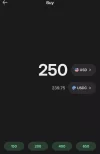
6. Buy the amount you need. You’ll be asked to complete KYC (photo + ID/driver’s license).

IMG_5550.webp

7. Once the purchase is complete, return to the main wallet screen.

8. Tap Send -> choose USDC (Solana).

IMG_5551.webp

9. Paste the Solana address provided by Q, enter the amount, and send.

IMG_5552.webp

10. After sending, open the transaction -> tap View on block explorer.

IMG_5555.webp

11. On Solana, the transaction Hash/ID is called Signature. Copy that long code.

12. Send the Signature to Q as payment confirmation.

That’s it. Simple and fast once you’ve done it once.

 
Last edited:
Here’s a clean, simple mini-guide for buying Solana -> USDC (Solana network) and sending it:

1. Download Trust Wallet and create a wallet.

2. After setup, go to the SOL token (from popular tokens) and buy about $5 of SOL first. This is just to cover network fees.

View attachment 378067

3. Go back to the main screen -> tap Buy (or Fund) -> All payment methods.

View attachment 378068

4. Choose Stablecoins -> select Solana network.

View attachment 378069

5. Pick USDC (Solana) or USDT (Solana), whichever you prefer.

6. Buy the amount you need. You’ll be asked to complete KYC (photo + ID/driver’s license).

View attachment 378070

7. Once the purchase is complete, return to the main wallet screen.

8. Tap Send -> choose USDC (Solana).

View attachment 378071

9. Paste the Solana address provided by Q, enter the amount, and send.

View attachment 378072

10. After sending, open the transaction -> tap View on block explorer.

View attachment 378081

11. On Solana, the transaction Hash/ID is called Signature. Copy that long code.

12. Send the Signature to Q as payment confirmation.

That’s it. Simple and fast once you’ve done it once.

Exactly... but that's what I'm trying to avoid cuz it sounds too complicated. Isn't there a way just to send it on Kraken without creating a wallet.
 
I'm going to try that first. I'm researching it but a lot of it is confusing. Setting up another wallet sounds like really confusing. Do you just send it straight from Kraken just using the free internal wallet they kind of give you without setting one up? I see on the directions doing it that way it doesn't say you can send usdc on Solana?
When you send money to Kraken , make sure when you convert money to USDT, switch to the free ProKrakcken version to buy coins. It will allow you to use your USDT immediately. If you use the regular version it makes you wait 7 days to use your coin.
I just send $1000. Go to free KrakenPro, convert to USDT , go back to regular Kracker , add buyers address under the Solana Network. Then go to "transfer" choose my USDT , then find Solana Network. You will then choose the sellers address you entered , add amount , ans send . It will then in about 2 minutes give you the hash to send to seller
 
When you send money to Kraken , make sure when you convert money to USDT, switch to the free ProKrakcken version to buy coins. It will allow you to use your USDT immediately. If you use the regular version it makes you wait 7 days to use your coin.
I just send $1000. Go to free KrakenPro, convert to USDT , go back to regular Kracker , add buyers address under the Solana Network. Then go to "transfer" choose my USDT , then find Solana Network. You will then choose the sellers address you entered , add amount , ans send . It will then in about 2 minutes give you the hash to send to seller
Can you just use the free version and buy it with your debit card?
 
Exactly... but that's what I'm trying to avoid cuz it sounds too complicated. Isn't there a way just to send it on Kraken without creating a wallet.
It really takes like 2 minutes. In Trust Wallet you just link your debit card, buy USDC or USDT, and send it from the same app. No extra steps, no juggling platforms, everything in one place. Kraken actually ends up being more hassle for this use case.
 
It really takes like 2 minutes. In Trust Wallet you just link your debit card, buy USDC or USDT, and send it from the same app. No extra steps, no juggling platforms, everything in one place. Kraken actually ends up being more hassle for this use case.
Thank you very much I'm going to go this route. So just to be 100% .I only have to download trustwallet. All those instructions you sent me are just on the trustwallet app right? Thanks again....that must have taken a long time to put all that together...a dummy like me needs this haha.
 
Thank you very much I'm going to go this route. So just to be 100% .I only have to download trustwallet. All those instructions you sent me are just on the trustwallet app right? Thanks again....that must have taken a long time to put all that together...a dummy like me needs this haha.
Yep, exactly, everything is done right inside the Trust Wallet app.

If you get stuck or something looks weird, feel free to ask. Otherwise, the old-school combo still works too: Google or YouTube never fails.
 
Can you just use the free version and buy it with your debit card?
I use the free version. Under the free version you switch to Pro for free also. The paid version might be worth it if you make a lot of purchases as it will save money on conversion fees.

Not sure about debit, it it should be an option. I just transfer from bank that I have linked
 
It really takes like 2 minutes. In Trust Wallet you just link your debit card, buy USDC or USDT, and send it from the same app. No extra steps, no juggling platforms, everything in one place. Kraken actually ends up being more hassle for this use case.
This is the way
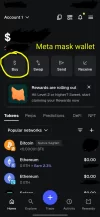
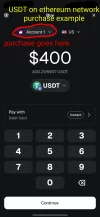
You can use several wallets that let you just buy usdt or usdc that goes directly into your own wallet. They do have fees but they aren't bad. Meta mask, exodus, trust wallet are some good ones.

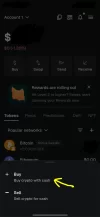
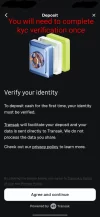
When you buy through a wallet with a debit card this is called on ramping. You will probably need to verify your identity in the USA but this is ez with an ID.

Edit: thank you meso admins for making this its own thread. I will make sure i stay on topic in source threads.
Thank you all
 

Attachments

  • ResizedImage_2026-02-09_19-39-47_0.webp
    ResizedImage_2026-02-09_19-39-47_0.webp
    91.5 KB · Views: 2
  • ResizedImage_2026-02-09_19-39-47_1.webp
    ResizedImage_2026-02-09_19-39-47_1.webp
    49.2 KB · Views: 2
  • ResizedImage_2026-02-09_19-39-47_2.webp
    ResizedImage_2026-02-09_19-39-47_2.webp
    79.9 KB · Views: 2
  • ResizedImage_2026-02-09_19-39-47_3.webp
    ResizedImage_2026-02-09_19-39-47_3.webp
    74.5 KB · Views: 2
  • ResizedImage_2026-02-09_19-39-47_4.webp
    ResizedImage_2026-02-09_19-39-47_4.webp
    96.8 KB · Views: 2
If you're from the UK avoid Coinbase at all costs for stablecoin. They lock your funds for 30 days after every purchase "for your own protection" and the only option they give you to get around this is to sell the coin back to them for a loss and use another exchange.
 
Back
Top