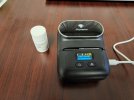
I just bought one and for the few labels I made, I love it. Got it on amazon. It was the Phomemo M110. It came with a few labels in the machine but I bought a roll of 30mm x 20mm which should work for vials and pills (see attached photo) It will use different sizes. It connects to your smartphone via Bluetooth. The app is pretty straight forward. I cannot speak for its longevity but it looks a hell of a lot better than my handwriting.
I know that maybe my answer is no longer relevant here, but I would like to know how you use this device? Because I'm going to buy the same one now and I'm wondering if it still works for you? And are there any problems?
I know that maybe my answer is no longer relevant here, but I would like to know how you use this device? Because I'm going to buy the same one now and I'm wondering if it still works for you? And are there any problems?
I know that maybe my answer is no longer relevant here, but I would like to know how you use this device? Because I'm going to buy the same one now and I'm wondering if it still works for you? And are there any problems?
This device is used by linking your smart phone to the printer via Bluetooth, then using an app, provided by the manufacturer, to create simple labels. After nearly a year but very little printing, it still works fine. It uses thermal paper labels, so the device uses no ink. I have noticed that after a year, the labels fade quite dramatically. They are still legible, but badly faded. You might be able to find better quality paper and solve that problem.
This site uses cookies to help personalise content, tailor your experience and to keep you logged in if you register.
By continuing to use this site, you are consenting to our use of cookies.